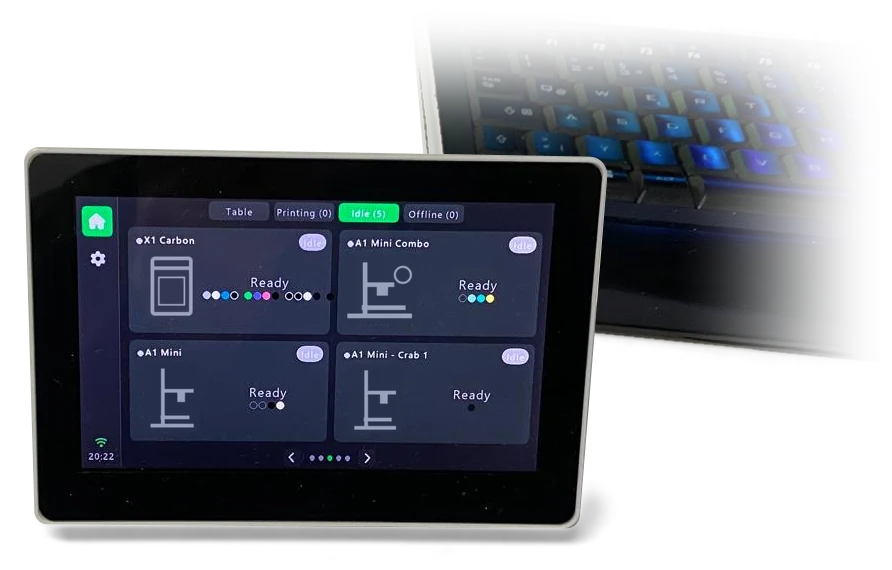
01 / YOUR DEDICATED SCREEN
Touch 2 printers free
A permanent view beside your tools.
Install on your own supported screen board.Build your screenBIG IDEAS. LESS CHECKING.
Your Bambu Lab printers. On a screen, in light, or on your iPhone and iPad.
Three ways to see what's happening. Start with one. Add more when you like.
A permanent view beside your tools.
Install on your own supported screen board.Build your screenWatch progress grow. Let the desk light itself.
Add your own controller, strip and power.Explore printer lights
Your phone. Your iPad. Your prints.
iPhone + iPad · Watch with Pro + Bridge.Explore the appAll three can connect directly to your printers. The free Bridge shares one printer setup across your views, and enables fresh lock-screen updates.
Runs on an always-on Windows or Linux computer · free for 10 printers · app pairing and Live Activities need ProBambu Lab printers only · software, hardware bought separately · App: demo printers · Glow: simulated light output · App Store release coming soon · Bridge coming soon
See what you need, what's free and where Pro fits. Every hardware project starts with a free install.
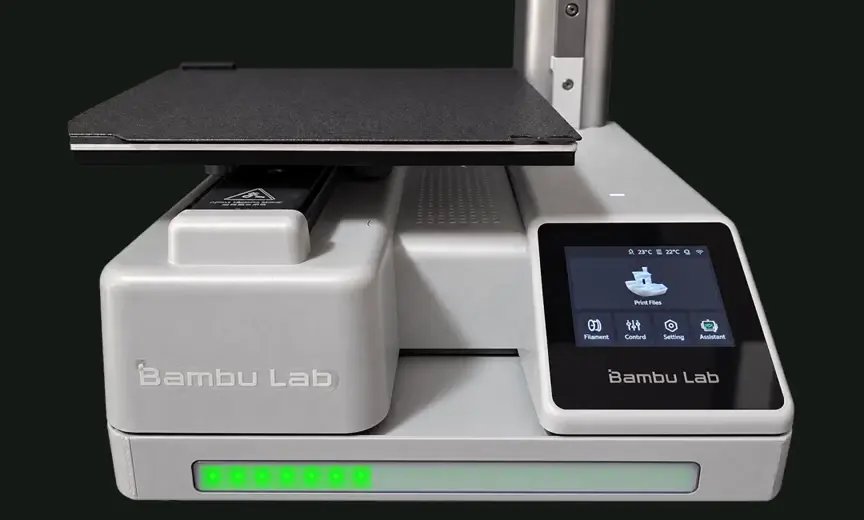
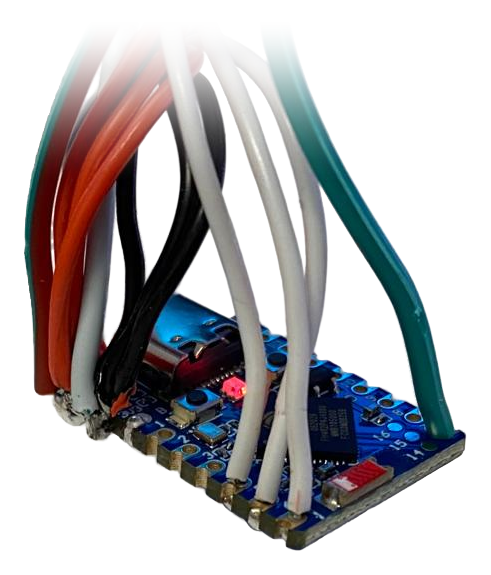 Controller
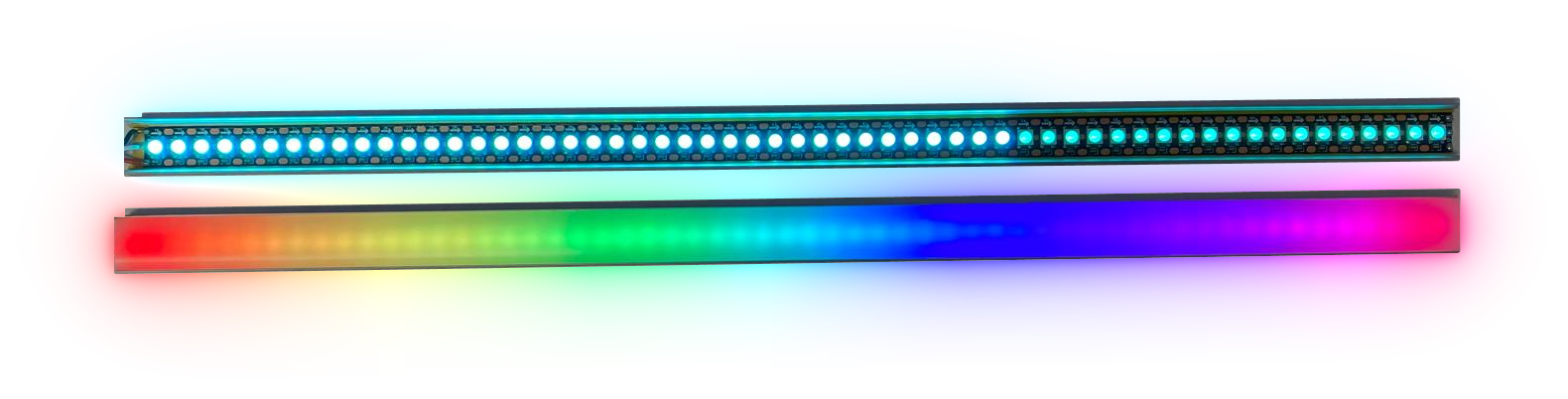 LED strip
Make a 20-LED progress strip like our A1 Mini example.
Software€10once · one Glow Pro controller
Start free: the first 10 LEDs on one controller.
Glow Pro unlocks the full 20-LED strip and your own colours. Try the first 10 LEDs free before upgrading.
Connect directly to one printer. No app or Bridge needed.
Software prices in EUR. Hardware bought separately. Applicable tax and the final total are shown before payment. Compare all Free and Pro features.
Give your printers a screen of their own. Tap into progress, temperatures and filament, then get back to making. No phone or tablet needs to stay beside the printer.
Install Touch on the supported 5-inch screen board by USB. Connect directly to your printers, or pair with Bridge.
Hardware bought separately. Choose the supported screen board, add USB power and an optional case. Pro software is a separate upgrade.
Your own dedicated printer display.
See a print grow along a strip. Spot a pause across the room. Celebrate a finished job in your favourite colour. Glow turns a small controller and LED strip into part of your printer.
With Pro, choose your colours and effects, reflect your loaded filament, and add automatic white work lighting. Start with a free 10-LED status strip; make it your own when you upgrade.
Demo mode without a printer lets Pro lights shine between jobs, too.
Watch the job grow along the strip.
Our A1 Mini stand, with simulated Glow Pro light output. Timing is edited; filament examples switch palettes. White work light is a separate strip.
See automatic white work lightingPick an effect, try a colour and move the progress yourself. This 57-LED preview shows Pro strip lengths; Glow Free starts with 10 LEDs.
Choose a mode
The illuminated length follows the current job percentage. A dim background keeps the full strip visible.
Free preset · configurable in ProBrowser simulation. Colours and timing are illustrative; brightness, strip length, and status behaviour are configured on the device.
Give your work area its own white light. Glow turns it on when printing starts, keeps it on through pauses, and switches it off when the job ends.
A separate green strip can show progress at the same time. Want a little longer to collect the print? Set an after-print delay.
We're looking for more working LED mounts, housings and strip designs for other printers. Share your design and help the next maker light up their setup.
Download the A1 Mini stand on MakerWorld
Explore the Glow Creator Programme One free Glow Pro licence per distinct approved working design. Message us.App release coming soon
Keep every printer's progress in view. See the file being printed, time remaining and loaded filament colours without opening each printer in turn.
Keep the app on your everyday iPhone, or give that spare iPad a new job as a printer dashboard. The app supports iOS and iPadOS 15 and later, including iPad Air 2. Try two printers free; Pro unlocks up to 10, and the Farm and Fleet plans up to 300.
App release status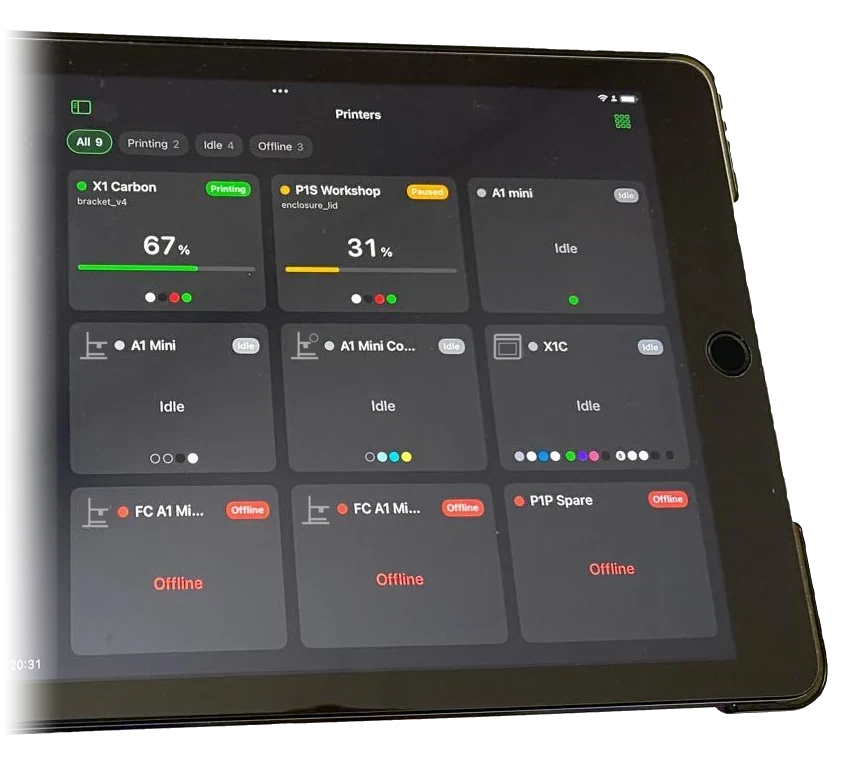
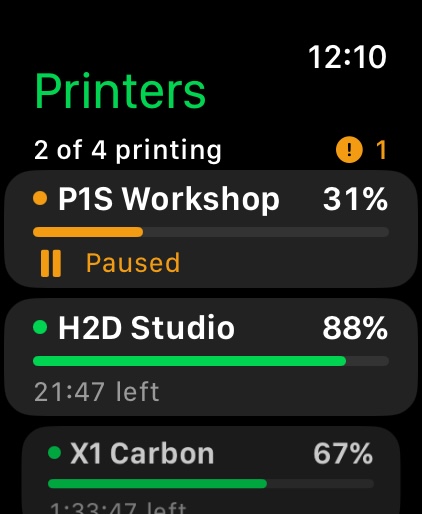
Illustrative previews. Apple controls widget refresh and Live Activity duration; open the app for the latest detailed view.
Bridge features coming soon Each Glow can connect directly to its printer today.
Like the lights in a car park that show you the free spaces, a short LayerGlance Glow bar under each printer turns a whole rack into a status board. Green grows with each print, and red blinks where someone is needed. No dashboard to open, no walking every row.
Each printer gets a small LayerGlance Glow controller and LED bar. The colours shown are included in Glow Free; register a free account when installing. LayerGlance Bridge runs a farm of up to 10 printers for free; the Farm and Fleet plans take it to 50 or 300 printers.
Install a light by USB from the LayerGlance Bridge setup page, in Chrome or Edge on the bridge computer, and it arrives knowing your Wi-Fi and its printer. Fit it, power it, and it glows within seconds.
Colours, effects, strips and brightness for the whole rack in one place, or give a single light its own. Change them any time, without touching a controller.
Lights along a rack pulse together, so the calm ones fade into the background and the one that needs you stands out.
New firmware reaches the whole farm from the bridge, a few lights at a time. Each light checks the signature, and returns to its previous firmware if the new one fails to start.
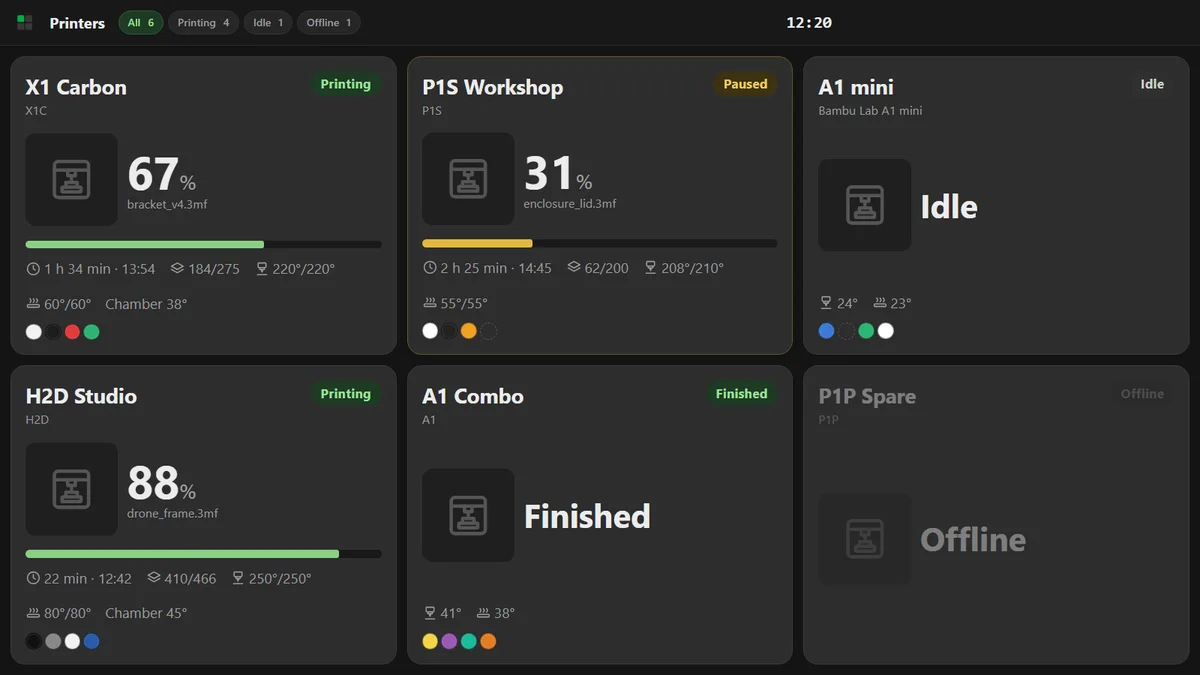
Enter printer details once. Pair the screens and lights you need. See the jobs on a dashboard and the status along your racks.
One Farm or Fleet plan makes every paired app, Touch screen and Glow controller Pro in Bridge mode.
Start with Bridge Free for 10 printers. Hardware separate; one controller per printer. Each Touch shows up to 8 selected printers. Annual plans renew until cancelled; website plans are for businesses. Applicable tax is shown before payment.Choose your Bridge platform ↗Free · up to 10 printers Bridge coming soon
LayerGlance Bridge runs on a computer that stays on near your printers: a Windows PC or a 64-bit Linux computer such as a mini PC. Add your printers once; the app, LayerGlance Touch screens and LayerGlance Glow lights all take it from there.
Turn the bridge computer into a wall display: a PC with a monitor or TV, or a Raspberry Pi with a touch screen. One switch shows every printer full screen at start-up, filtered to what is printing, idle or offline. The screen stays awake and the view is made for touch. The Raspberry Pi build is verified under ARM64 emulation.
See each light, its printer and its firmware at a glance. Rename, reassign or restyle one light, or the whole rack, in a single step.
Enter printer details once. Pair each app or screen with a short code; the bridge remembers your Wi-Fi for the next light.
Start on a desktop PC, move to a mini PC or a server later. Take everything across in one encrypted file. One step on the old bridge sends screens and lights to the new one; the app asks you to confirm the new address once.
With Apple push enabled and LayerGlance Pro in the app, the bridge keeps sending Live Activity updates while the app is in the background. Apple controls when they arrive.
Printers are reached locally with their access code, without a Bambu Cloud account. Lights never receive printer access codes; paired apps and screens get them only in encrypted form, so they can reach a printer directly if the bridge is away.
Optional for the app and a single screen or light; the backbone for a farm.
The bridge is free and looks after up to 10 printers. Touch screens and Glow lights can use it on Free, within their Free limits; in the iPhone and iPad app, bridge mode is part of LayerGlance Pro. A Farm or Fleet plan on the bridge, for up to 50 or 300 printers, also makes every paired app, screen and light Pro while it runs in bridge mode. Run it on a Windows PC or 64-bit Linux computer that stays awake for fresh updates. The 64-bit Raspberry Pi OS build is verified under ARM64 emulation; native Pi hardware testing is still pending.
Choose your product, then compare Free and Pro. No subscription is needed for your everyday setup.
A permanent view beside your tools. Room for eight printers on one screen.
| Features | Free€0No time limit | Pro€19.90per screen · one timeGermany total · VAT-exempt direct sale |
|---|---|---|
| Printers per screen | 2 | 8 |
| Live status, progress & temperatures | Included | Included |
| Connect directly to printers | Included | Included |
| Connect through Bridge | Included | Included |
| Touchscreen & browser setup | Included | Included |
Software licence only. Buy the supported hardware separately.
Count printers for Bridge, and controllers for Glow. One Glow Pro controller can drive up to four strips, all following the same printer. Different printers need separate controllers. Extra paired apps, screens and lights do not consume extra Bridge printer places.
Germany total · introductory Glow price
Want the app to pair with Bridge, or use Watch? Add app Pro for €24.90 once in the German App Store.
Germany totals · introductory Glow price
Only need ten LEDs per light? Use Glow Free and the total becomes €24.90.
Software prices only; hardware separate. Glow Pro supports up to 300 LEDs per strip. No Farm subscription is needed for either example.
One yearly plan on one Bridge unlocks Pro for every app, Touch screen and Glow controller paired with it. You do not need to buy their separate Pro licences.
| One Bridge | Free€0 | Farm€49per year | Fleet€149per year |
|---|---|---|---|
| Printers on Bridge | 10 | 50 | 300 |
| Shared printer setup | Included | Included | Included |
| Pro on all paired devices | Not included | Included | Included |
Each Touch shows up to eight selected printers; each Glow follows one printer. Plans renew yearly; cancel for the end of the paid year. Website plans are for businesses; personal plans are bought in the app.
Building a screen and lights? Touch Pro + Glow Pro together: €24.90 once in Germany. Save €5 against separate German prices. App and hardware sold separately.
View the bundle ↗Website prices shown are totals for Germany: qualifying direct purchases are VAT-exempt under §19 UStG. Buying elsewhere? Choose your billing country on the product page to see its price and tax information before signing in. Link confirms the exact tax-inclusive total for your billing address before payment. Apple shows the regional app price before purchase.
EUR catalogue prices for website licences and business Farm/Fleet plans. Direct purchases from FiddlerCrab have final prices without VAT under §19 UStG. For purchases sold through Link as merchant of record, these prices are before customer tax; Link shows the final total and currency before payment and supplies the receipt and invoice. Confirm your billing country and software use to see the applicable seller and terms before continuing. Plans renew yearly until cancelled; cancel any time for the end of the paid year. App purchases are sold by Apple at the regional price shown in its purchase sheet.
We sell the firmware, not a hardware kit. Buy the supported parts yourself, flash them in the browser, and keep control of the whole build.
Select the touch, upgraded 1024 × 600 5B version. It includes the ESP32-S3, 16 MB flash, 8 MB PSRAM, GT911 capacitive touchscreen, and Wi-Fi on one board.
Use a data-capable cable for browser installation, not a charge-only lead. No Raspberry Pi or separate ESP32 is needed.
Optional for a finished installation. Keep the board's antenna area clear of metal.
The 800 × 480 model, non-touch 5B, and other Waveshare displays are not supported by the LayerGlance Touch installer.
Choose the standard 4 MB flash / 2 MB PSRAM board, with or without pre-soldered headers. Do not select the N8R8 variant.
Individually addressable, three-wire +5 V / DIN / GND, using RGB pixels in GRB order or SK6812 RGBW pixels in GRBW order. Choose natural white (about 4000 K) for a white work light. Do not buy a 12 V strip, non-addressable analogue RGB, or a four-wire clocked strip.
Small setups: a good 5 V / 3 A USB-C charger powers the board and a strip of up to about 30 LEDs through the board's 5 V pin, at the firmware's default brightness. Larger setups: give the strips their own regulated 5 V supply, sized for the strip manufacturer's maximum current. If no lower figure is specified, allow a conservative 60 mA per RGB LED plus headroom. Long or multiple strips need suitable wiring, fusing, and power injection.
Not needed for a short strip, but cheap insurance: one 330–470 Ω data resistor per strip, close to the board, and a 500–1000 µF capacitor across the strip's 5 V and GND where power enters. Many strips already include them. Only if the first LED flickers with a long data wire, add a 74AHCT125 level shifter.
Needed for flashing and assembly. The default strip data pins are GPIO 4, 5, 6, and 7.
The app while open, the dedicated screen and LayerGlance Glow lights can connect directly to supported printers on your home network. No LayerGlance Bridge is needed for this. See the compatibility guide for your printer's setup requirements.
LayerGlance Bridge keeps up with several printers at once and shares their progress with your paired app and screen. It also sends supported iPhone lock-screen updates through our push service and Apple's notification service. Those updates need an internet connection; the bridge still reads printer data locally.
No Bambu password to hand over. Setup uses each printer's local access code. Printer passwords are not sent to us.
A free helper for the app and screen.LayerGlance Bridge shares the monitoring work and simplifies setup. The dedicated screen can fall back to checking printers directly. Fresh iPhone lock-screen updates need the bridge to stay on.
LayerGlance Glow does not need LayerGlance Bridge. It follows one printer directly. In a print farm it can take its printer, colours and updates from the bridge instead.