One printer setup. All your views.
Let a computer that stays on collect printer status once. Pair your screens, lights and app to that shared setup, and put a full-screen dashboard where the workshop can see it.
- 10 printers free
- Windows · Linux · ARM64 Pi
- Optional for direct Touch and Glow
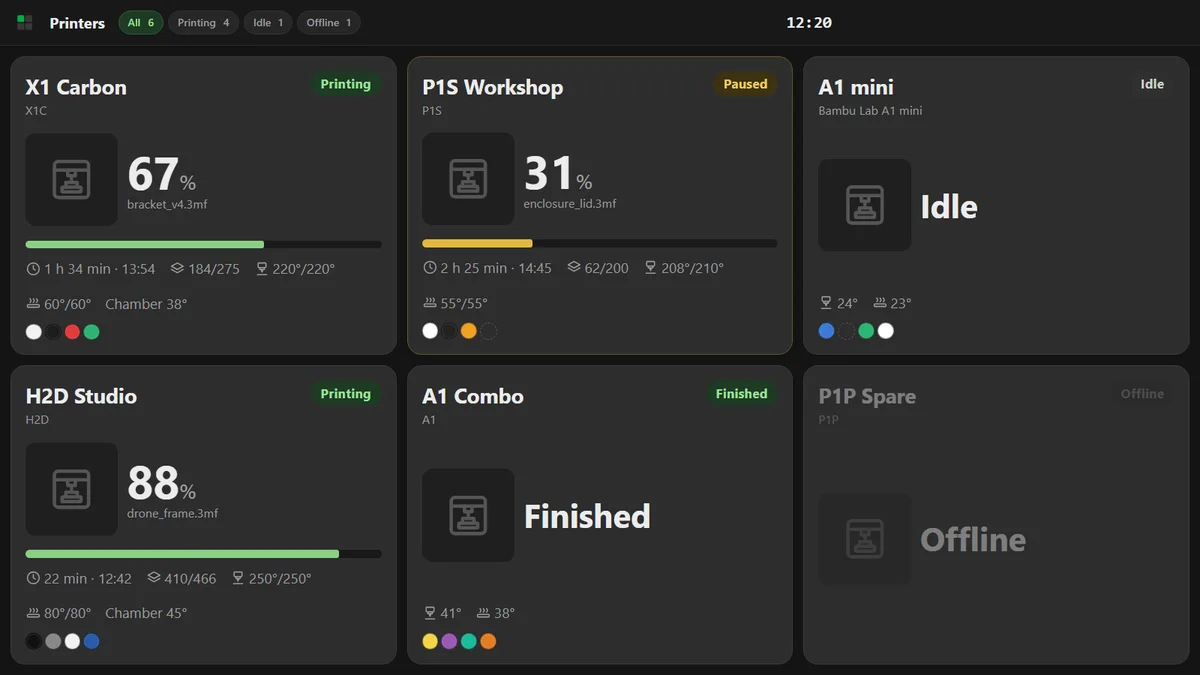
Put printer status where you look.
Enter printer details once
Keep printer names, connection details and photos in one local setup. Generate a pairing code to connect a compatible app, Touch screen or Glow controller.
Keep the phone's connection at home
Bridge keeps monitoring when the phone app is suspended. The supported Pro app setup uses Bridge and Apple push for fresh lock-screen status; internet access is needed for push updates.
Use a shared workshop display
Show the TV dashboard on a monitor connected to the Bridge computer. Configure Display settings to open it full screen at startup.
Grow without replacing every view
The free Bridge supports ten printers. Farm and Fleet raise the Bridge limit to 50 and 300, and cover paired views in Bridge mode within each device's display limits.
& iPad
screens
lightsLight, progress & alerts
Start with the right parts.
- An always-on Windows 11 x64 PC or supported 64-bit Linux computer. Check the downloads page for each platform's current availability.
- Linux x86-64: Debian 12/13 with systemd. ARM64: Raspberry Pi OS Bookworm or later; qualified under ARM64 emulation, with physical Pi testing still pending.
- A reachable local path to your Bambu Lab printers. On Windows, use a trusted Private or Domain network; Public-network inbound access is blocked.
- A FiddlerCrab account for the free installation licence. Printer settings and connection details stay in the Bridge's local storage.
Check the full printer, device and network compatibility guide →
Try Free. Upgrade for your setup.
Free
Bridge itself supports ten printers without a paid Bridge subscription. Touch and Glow can pair on Free within their own limits; app pairing needs a paid app plan.
When you need more
Buy per-device Pro upgrades when you need them, or use Farm/Fleet for one larger Bridge setup. Farm/Fleet make paired views Pro while in Bridge mode; Touch still displays up to eight selected printers and each Glow follows one.
Compare features and current prices →A free licence is registered to your account. Hardware is bought separately. Paid licences and purchases follow the terms; the website checkout shows the applicable country total before payment.
Before you start.
Do I need Bridge for a single A1 Mini light?
No. One Glow controller can connect straight to the printer, and a Touch screen can connect directly too. Add Bridge when shared setup or supported lock-screen updates are useful.
Does Bridge replace my printer's firmware or Bambu Cloud?
No. It reads the printer's local status. You install Bridge on your computer, not on the printer, and LayerGlance does not ask for your Bambu Cloud password.
Can I run it on a Raspberry Pi?
There is a 64-bit ARM64 bundle for supported Raspberry Pi OS. Its software qualification uses ARM64 emulation. Use the compatibility and download requirements; a physical Pi acceptance test is still pending.
LayerGlance is an independent FiddlerCrab product for compatible Bambu Lab printers. It is not affiliated with or endorsed by Bambu Lab. Publisher details.