A dedicated screen. For your printers.
Keep print progress beside your tools, with a clear overview and details a tap away. Your phone can stay in your pocket, and your printer status can stay on the bench.
- 5-inch touchscreen
- 2 printers free · 8 with Pro
- Direct or Bridge connection
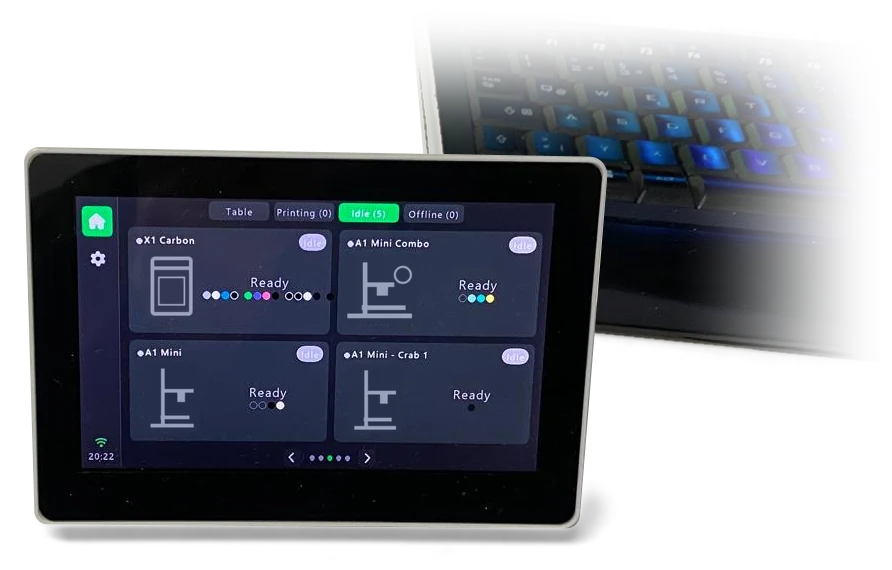
Put printer status where you look.
One place for the whole bench
See which printers are printing, idle or offline. Follow reported progress and remaining time without opening another app.
Tap for the detail
Check temperatures, layer progress and loaded filament. AMS, AMS Lite and AMS HT readings use the printer's local status interface.
Give status a permanent home
Power the supported touchscreen by USB and place it in a stand or enclosure of your choice. Touch is firmware for a DIY display, not a screen we ship.
Choose direct or shared setup
Connect the screen directly to your printers, or pair it to Bridge. Both connection routes work within Touch's Free printer limit.
Start with the right parts.
- Waveshare ESP32-S3-Touch-LCD-5B, the supported 1024 × 600 touch version. Similar-looking boards can have different panels or pin layouts.
- Stable USB power and a reachable 2.4 GHz Wi-Fi network.
- Your printer's IP address, serial number and LAN access code.
- Desktop Chrome or Edge and a USB data cable for the browser installer.
Check the full printer, device and network compatibility guide →
Try Free. Upgrade for your setup.
Free
Monitor two printers on one screen, directly or through Bridge. Try the real hardware and printer connection before choosing an upgrade.
When you need more
One device-bound Touch Pro licence raises that screen's limit to eight printers. Hardware and iPhone/iPad app upgrades are separate.
Compare features and current prices →A free licence is registered to your account. Hardware is bought separately. Paid licences and purchases follow the terms; the website checkout shows the applicable country total before payment.
Before you start.
Do I need an iPhone or a Bridge?
No. Touch can monitor your printers directly. A Bridge is useful when you want to share one printer setup with several screens, lights or a supported app setup.
Will any ESP32 touchscreen work?
No. Use the exact Waveshare ESP32-S3-Touch-LCD-5B version listed in the compatibility guide. The installer checks the controller before writing.
How do later firmware updates work?
Touch checks signed firmware before installing a normal OTA update. You can also use the browser installer's settings-preserving update option on supported hardware.
LayerGlance is an independent FiddlerCrab product for compatible Bambu Lab printers. It is not affiliated with or endorsed by Bambu Lab. Publisher details.