Your iPhone. Your iPad. Your prints.
See the print without standing beside it. Keep a printer collection in view on your phone, turn a spare iPad into a dashboard, or add a supported glance from your wrist.
- iOS / iPadOS 15 or later
- 2 printers free · 10 with Pro
- Watch, widgets & Live Activities with Pro
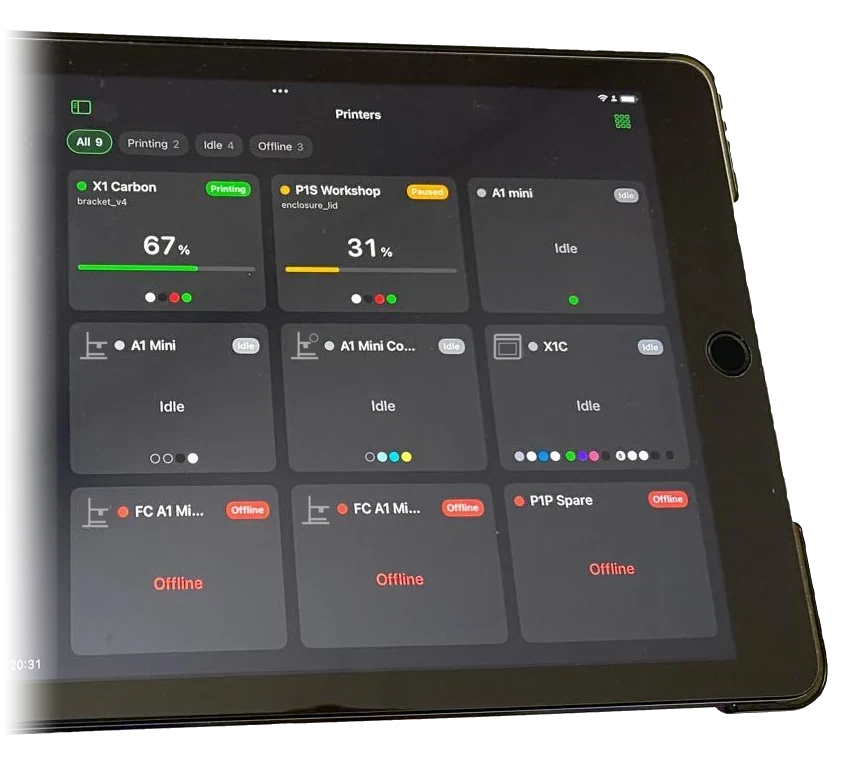
Put printer status where you look.
Read the room at a glance
Compare printer states in a grid or table. Open a printer for its reported progress, remaining time, temperatures, filament and alerts.
Give an older iPad a new job
The dashboard runs on iPadOS 15 or later, including a compatible updated iPad Air 2. Keep LayerGlance open and use its Keep screen awake setting for a permanent bench view.
Keep status on the lock screen
Pro with an always-on Bridge supports fresh Live Activity updates. Widgets and Live Activities need iOS/iPadOS 17 or later; Apple controls refresh timing and activity lifetime.
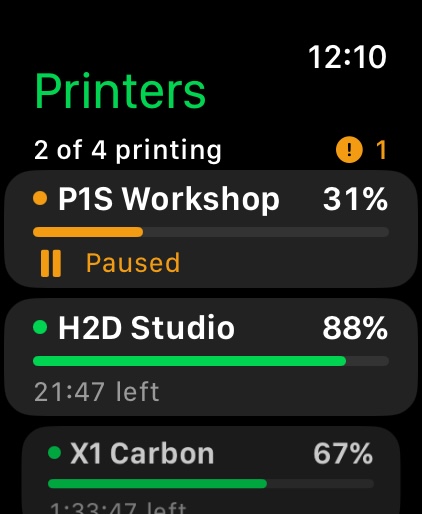
Take a glance from your wrist
The included Apple Watch companion needs watchOS 10 or later, a compatible paired iPhone, Pro and Bridge. It complements the phone app; it is not a standalone printer connection.
Start with the right parts.
- An iPhone or iPad running iOS/iPadOS 15 or later for the dashboard.
- Compatible Bambu Lab printers reachable over your local network and their LAN connection details.
- Local Network permission for direct printer access. Keep the app open for continuous direct monitoring.
- For Bridge mode and the Pro companion features: a paid app plan and a supported always-on Bridge setup.
Check the full printer, device and network compatibility guide →
Try Free. Upgrade for your setup.
Free
Monitor two printers directly while the app is open. Register your Free licence with a FiddlerCrab account using email, Apple or Google; link other sign-in methods from your account.
When you need more
Pro supports ten printers, Bridge mode, widgets, Live Activities and Apple Watch within their system requirements. Farm and Fleet plans cover larger Bridge-based collections. App upgrades are purchased in the app.
Compare features and current prices →A free licence is registered to your account. Hardware is bought separately. Paid licences and purchases follow the terms; the website checkout shows the applicable country total before payment.
Before you start.
Is there an Android app?
The app is for iPhone, iPad and Apple Watch. Touch and Glow are separate DIY devices, and Bridge has a browser-based setup page. They do not require an Android app.
Why do direct connections pause when I leave the app?
iOS can suspend local network work in the background. Use an always-on Bridge with the supported Pro Live Activity setup for updates while the phone is locked.
Can I use my normal Bambu apps too?
LayerGlance uses the printer's local interface without your Bambu Cloud login. On supported printer firmware, you can keep the official Bambu apps and do not need Developer Mode. Check compatibility for current limitations.
LayerGlance is an independent FiddlerCrab product for compatible Bambu Lab printers. It is not affiliated with or endorsed by Bambu Lab. Publisher details.